
 BY NUMBER7 AI
Number7 research · AP operator / accounting firm / developer
How to Process Multiple Vendor Invoices from One PDF
DIRECT ANSWER To process multiple vendor invoices from one PDF, identify each invoice's page boundaries, keep continuation pages together, assign the correct vendor and client entity, extract and validate the data, then review and send each approved bill to accounting. AIdaptIQ connects those steps in one AP workflow, including arithmetic repair, client coding memory and email-based clarification.
Keep boundaries and context intact
Example invoice bundle · not a measured customer result
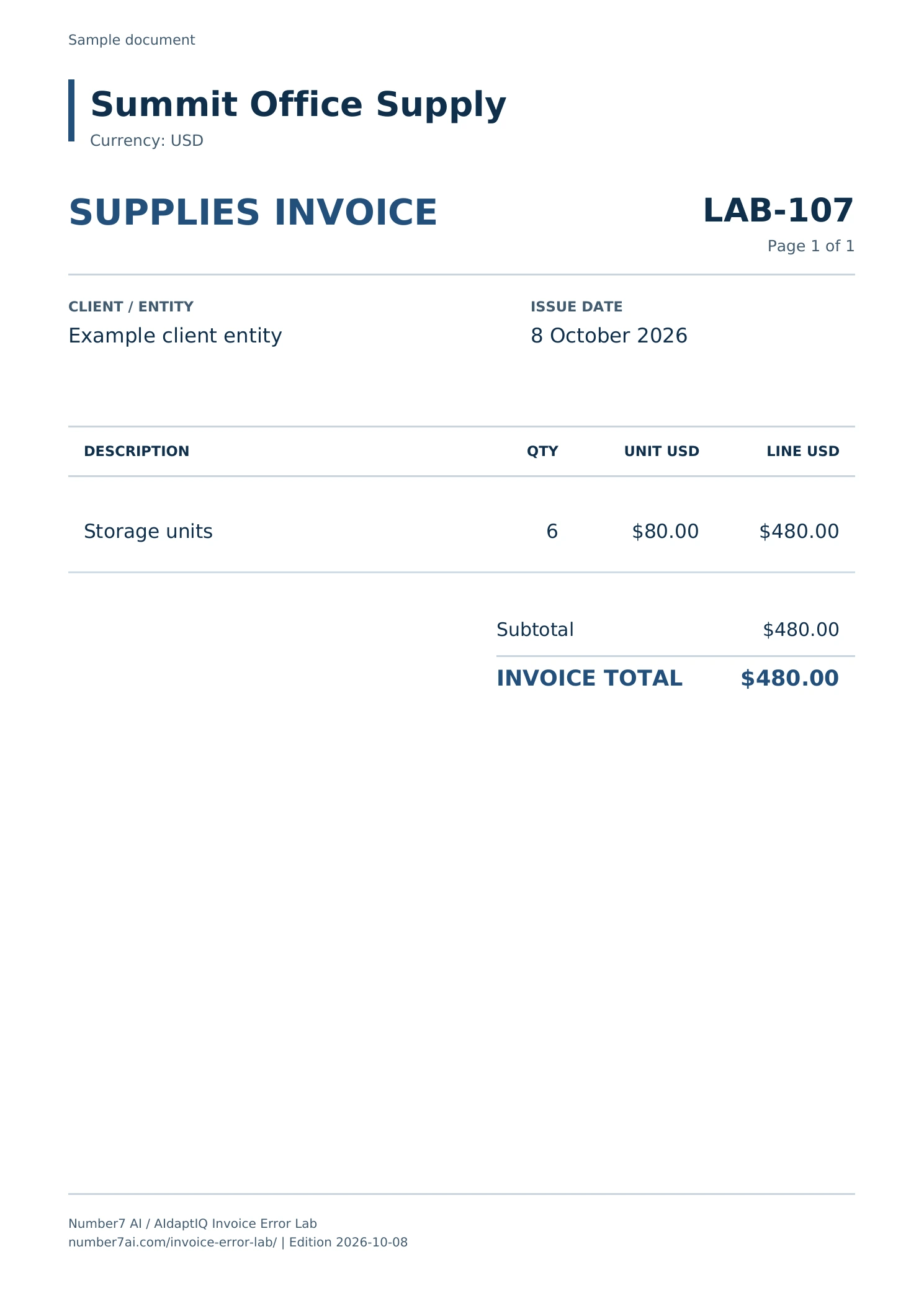
Source pages 2–3
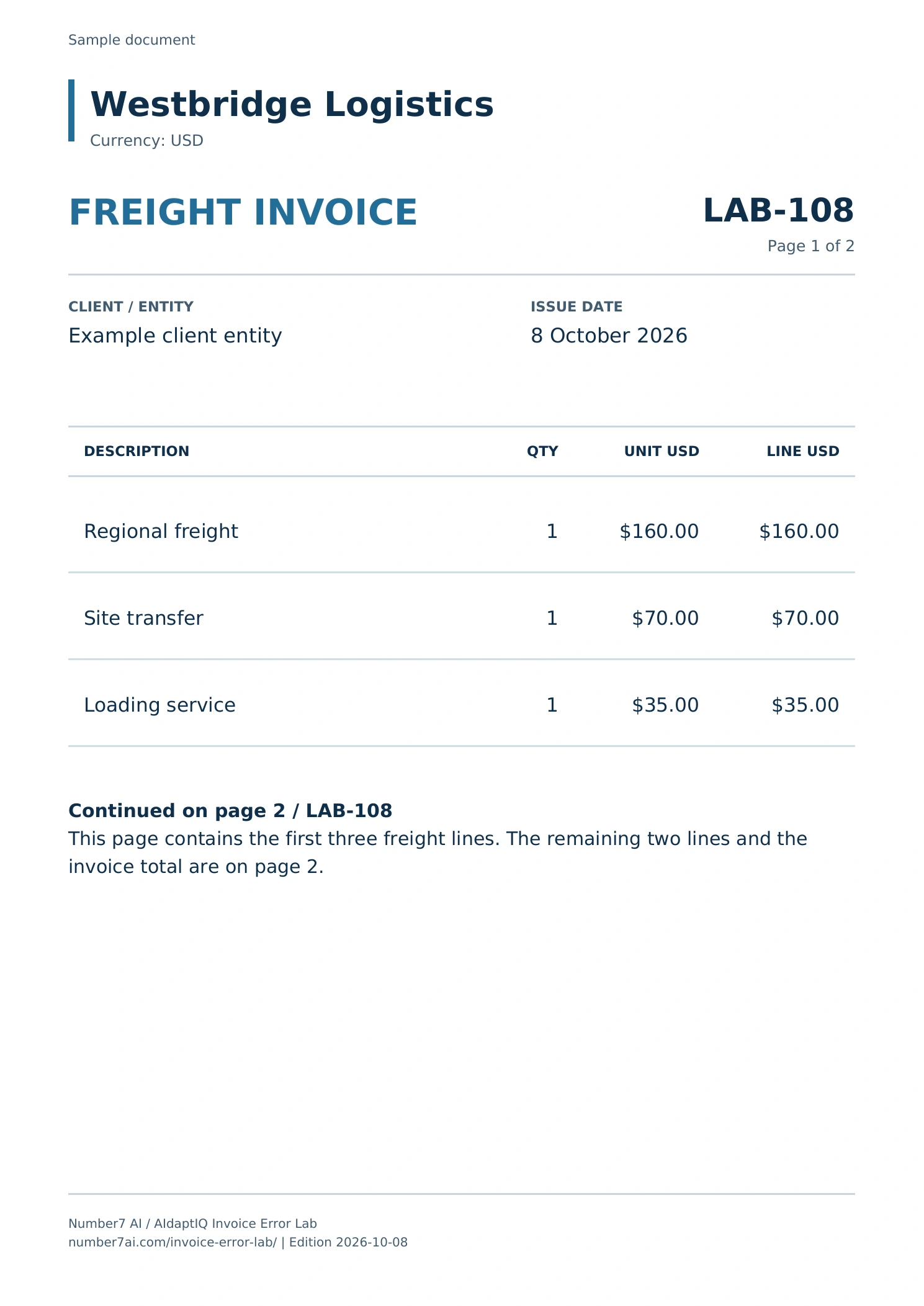
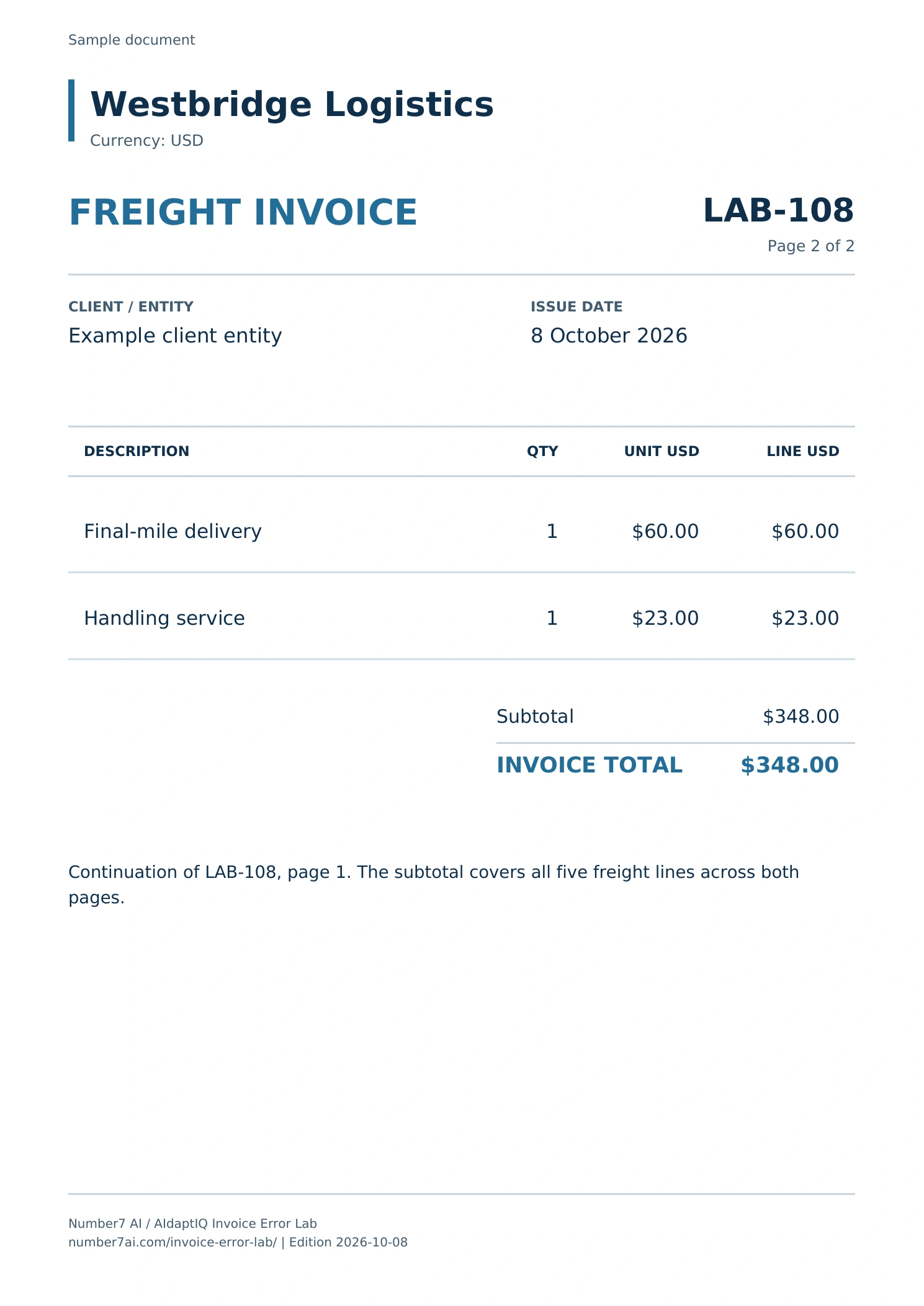
Continuation pages stay together.
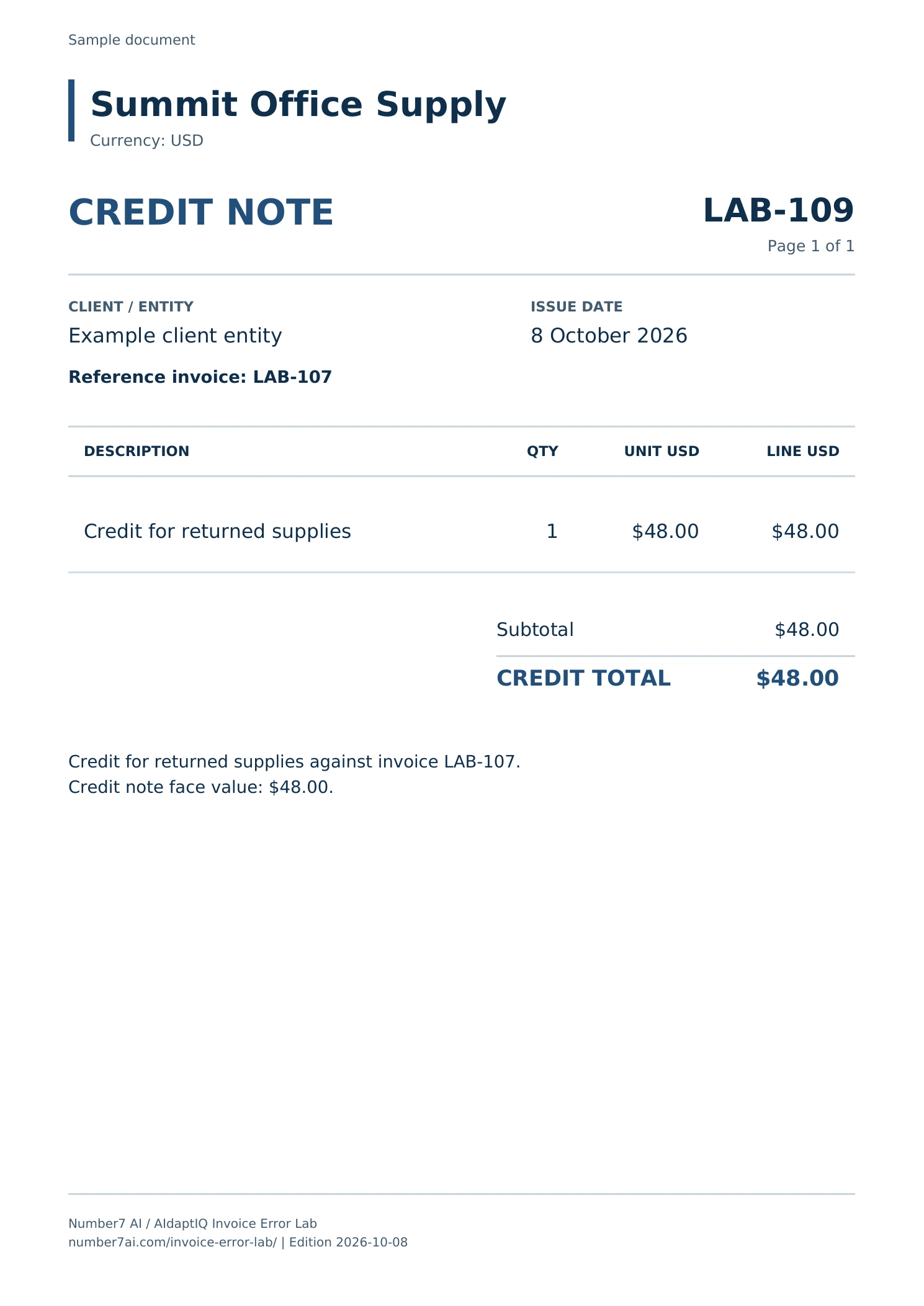
Source pages remain attached to their document. The credit note’s face amount is $48.00; its signed accounting amount is −$48.00 in this example.
Inspect the full source and boundary map- One PDF can contain several invoices, and one invoice can span several pages.
- Splitting every page creates errors when line items or totals continue onto another page.
- Vendor identity, client entity, amount checks and duplicate checks belong after separation.
- Keep the source and conversation with each bill so a reviewer can resolve an ambiguity without rebuilding the batch.
A worked example: four pages, three accounting documents
The downloadable source pack uses LAB-107, LAB-108 and LAB-109 for this same four-page boundary pattern. Open any source page above to inspect the original PDF.
| Source pages | Document | Required decision |
|---|---|---|
| Page 1 | Vendor A invoice A-104 | Create one invoice record |
| Pages 2–3 | Vendor B invoice B-208, with continued line items | Keep both pages in one invoice record |
| Page 4 | Vendor A credit note CN-017 | Identify a credit note and retain its invoice reference |
This is an illustrative batch, not a customer benchmark. The important relationship is between a source page and its accounting document. Different documents from the same vendor should not be merged merely because the supplier name matches.
Why splitting a PDF is only the first step
A supplier packet, scanned batch or forwarded attachment may contain several bills and supporting pages. Separating the file makes those bills available for processing, but it does not establish their identity, coding or accounting outcome.
For example, the first page might be a one-page invoice from Vendor A. The next two pages might be one invoice from Vendor B with a continued line-item table. A fourth page might be a credit note from Vendor A. A page-by-page split would break Vendor B's bill and could lose the credit relationship. Extracting the entire PDF as one record would combine transactions that belong apart.
Start by establishing the document families. Then process each bill within the correct accounting context.
Step 1: identify invoice boundaries
Use vendor identity, invoice number, page numbering, document type and layout continuity together. A new invoice number can indicate a new bill; a repeated invoice number with a continued table can indicate the next page of the same bill.
Treat cover sheets, statements and receipts as their own document types where appropriate. If a page cannot be assigned confidently, make that uncertainty visible instead of dropping the page or attaching it to the nearest bill without review.
Step 2: preserve multi-page bills and source references
Keep line-item continuation pages, tax summaries and the bill's final total together. A reviewer should be able to open the source pages behind the structured result.
If boundaries need repair, correct the grouping before proceeding. Preserve the relationship to the original attachment so the team can explain which pages produced a bill. Ask the vendor to show how a changed grouping affects the extracted result and subsequent workflow.
Step 3: resolve vendor and client entity
The vendor printed on a bill and the client whose books receive it are separate identities. A batch supplied by an accounting firm may include many vendors for one client, or documents that must be assigned to different client entities.
Resolve both before applying coding or publishing. Similar supplier names, a shared sender address or a forwarded email can make assignment ambiguous. Send that question to an accountable reviewer rather than relying only on the filename.
Step 4: extract the fields and line items you need
For each invoice, extract the required number, dates, currency, amounts, tax and vendor information. Include quantities, unit prices and line-item descriptions when the accounting or matching workflow needs them.
Check that the second page's line items belong to the right invoice and that the extracted total comes from the right document. Retain credit notes as credits; do not quietly treat them as another payable invoice in the batch.
Step 5: validate arithmetic and repair recoverable errors
Compare line extensions, subtotal, discounts, taxes, charges and the final total in the context of that invoice. Decimal reading errors, missed signs or a value taken from the wrong column can produce plausible-looking output with inconsistent arithmetic.
AIdaptIQ's self-healing invoice processing automatically repairs recoverable invoice arithmetic errors. When the source itself conflicts or the intended amount remains ambiguous, the workflow needs a supported review decision. Making the numbers add up is not permission to invent a supplier's commercial terms.
Step 6: apply client coding and purchase context
Use the correct client's accounting treatment. AIdaptIQ's client coding memory applies how each client codes recurring vendors to future bills. That matters when the same supplier is treated differently across client books.
For PO-backed bills, match against the purchase order, receipts and earlier invoiced quantities. Stateful three-way matching handles partial receipts, cumulative invoices and corrections by carrying the relationship forward. For non-PO bills, follow the configured business-purpose, coding and approval path.
Step 7: resolve questions without losing the invoice
An invoice may need a project code, a missing receipt or clarification of a charge. Ask from the invoice rather than starting an unrelated email chain.
AIdaptIQ lets team members and clients participate through email without a platform seat. Their replies return to the originating invoice and automatically update its workflow. The reviewer can see the previous conversation alongside the source and the next action. Configured review and approval still determine when the bill is ready to proceed.
Step 8: send approved bills to the accounting system
Check each approved bill's vendor, entity, amounts and coding, then inspect the accepted accounting result. In AIdaptIQ's QuickBooks Online workflow, retain the returned bill identifier and follow any owned integration failure.
Do not treat “upload complete,” “extraction complete” and “bill accepted by accounting” as the same event. If an accounting request times out, reconcile the outcome before retrying so uncertainty does not become a duplicate bill.
How to test software for combined invoice PDFs
Build a small test set containing a one-page invoice, a multi-page invoice, a credit note, a repeated document, a poor scan and an ambiguous vendor or entity. Add the bundles that regularly cause manual work in your team.
Count boundary repairs, field corrections, client questions, active review minutes and accepted bills. Track source pages through the process to make sure no page silently disappears. Use the same test batch for every product and include work performed before upload.
Automatic splitting is available in several products, including Nanonets and Rossum. Evaluate what happens after the split: the usable bill, client context, resolution path and accounting outcome are the relevant result for an AP team.
Method, sources and limitations
Sources and workflow scope
Published 8 October 2026 by Number7 AI. The procedure and worked batch are editorial examples. AIdaptIQ capabilities were confirmed by its product owner; this article does not publish a measured throughput or accuracy result.
Next step
Follow each bill through to its outcome.
Preserve its source pages, client identity, question history and returned accounting identifier.
Download the PDFs and checked answersInspect the source and the calculation together.