FOR ACCOUNTING FIRMS & CAS TEAMS

Review more client books without checking every invoice.

AIdaptIQ handles document intake, transaction checks, client questions and QuickBooks handoff so reviewers can focus on accounting judgment rather than routine verification.

LIVE CLIENT CLARIFICATION

Three client books. One reviewer’s attention.

CLIENT 042Coding precedent
CLIENT 017Ask client from bill
CLIENT 088Routine batch ready
One reviewerQuestion + source + prior history + recorded outcome

Client evidence arrives

Shared intake preserves the client boundary on every document.

Inspect stage records
CLIENT 042Invoice + source PDFReceived
CLIENT 017Approval evidence missingHold
CLIENT 088Routine invoice batchReceived

Select a stage to pause and inspect the detail.

ACCOUNTING & CAS · MULTI-CLIENT DELIVERY

More client books per team—not one generic AP queue.

AIdaptIQ preserves each client’s accounting context while routine invoices proceed and only the unresolved accounting question reaches the reviewer.

CLIENT 042Restaurant groupLocation + class context
CLIENT 017Services companyApproval evidence missing
CLIENT 088Project businessCustomer + project context
REVIEWER ATTENTIONOne accounting questionSource · prior treatment · material consequence · next action
LIVE IN AIdaptIQ

Question from INV-2048 Please confirm the missing approval evidence.

Previous history retained Earlier comments and replies remain beside the bill.

Reply linked → controls replay

Workflow closure required

  • Portfolio and client isolationRoute every document, rule and action to the correct client book.
  • Client-specific accounting contextVendor, GL, location, class, department and project treatment stay scoped.
  • Exception-first reviewRoutine work recedes; changed precedent and material risk reach reviewers.
  • Client clarificationAsk from the invoice, retain the complete previous history and bind the reply.
    AVAILABLE NOW
  • QuickBooks handoffRetain the reviewed transaction, returned identifier and owned failure.
    DEPLOYMENT-DEPENDENT
  • Portfolio readinessExpose client response, approval and material blockers to partners and controllers.

The reviewer should receive

  • The questionWhat changed or remains unsupported.
  • The sourceInvoice, evidence locator and affected accounting field.
  • The precedentThe client-specific prior treatment and applicable rule.
  • The next actionDecide, ask the client, approve or hold.
01Bookkeeping

Capture, code, review and post across multiple client books.

02Scaled CAS

Add client rules, dimensions, recurring exceptions and clarification.

03Virtual controller

Prioritize materiality, approvals, client dependencies and close blockers.

Best first scope: three contrasting client books—one routine, one exception-heavy and one growing—measured on touches and reviewer demand.

THE REVIEWER’S DAY

Open the question, not every document.

One queue carries the decision, the relevant source and the client boundary. Routine items remain out of the reviewer’s way.

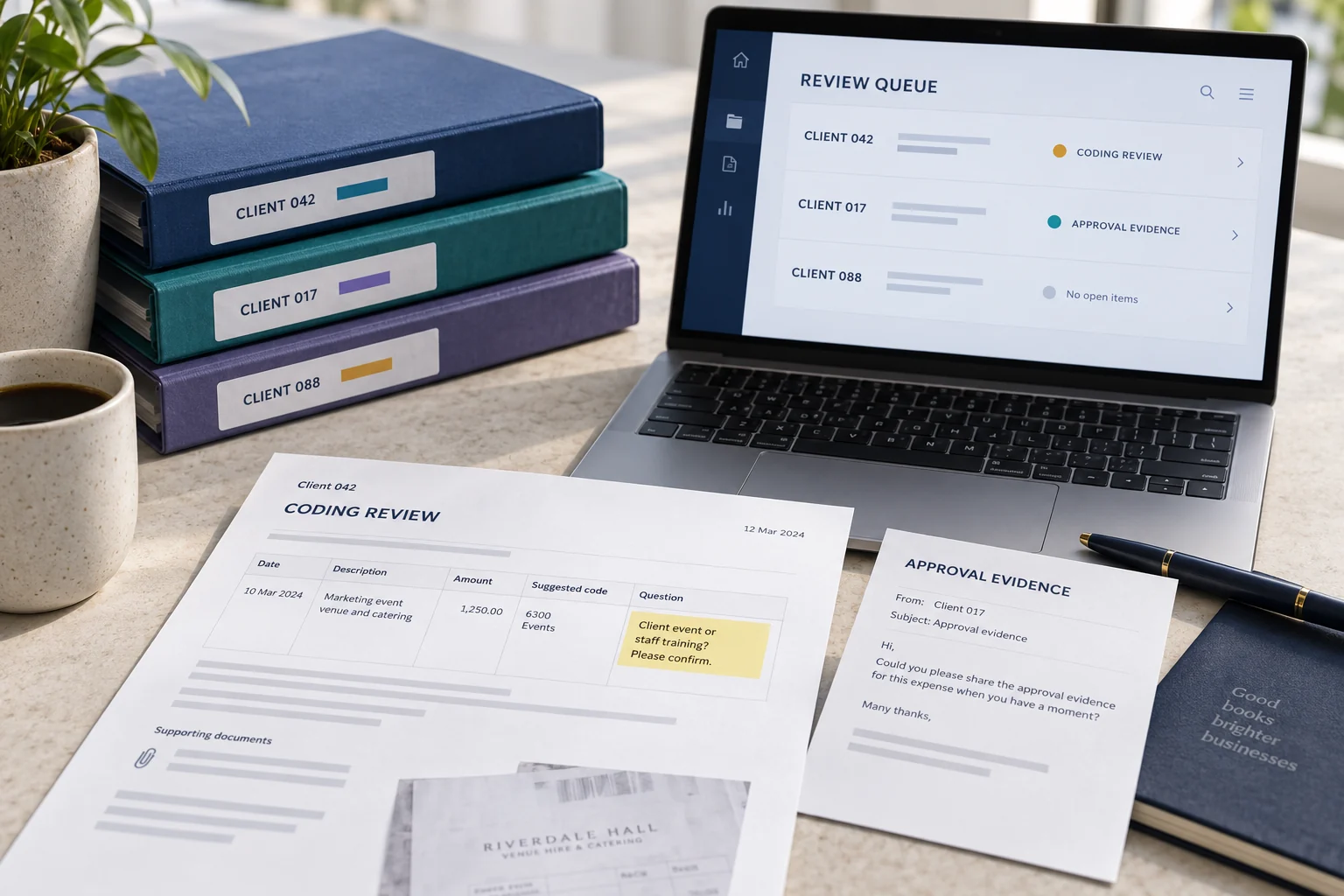
Accounting reviewer workspace with separate client books, a coding question and an approval-evidence request
DIRECT ANSWER

How does AP automation increase reviewer capacity for accounting firms?

It removes routine verification, document chasing and handoff work across client books while preserving client-specific evidence, accounting context and review authority.

INSIDE THE WORKFLOW

The operating model, made visible.

See what needs attention, who owns the decision and what must happen next.

PRODUCT STORYAIdaptIQ client invoice workspace
ILLUSTRATIVE REVIEWER QUEUEShared team. Separate client context.
CLIENT 042Coding precedent changedJudgment
CLIENT 017Missing approval evidenceClient input
CLIENT 088Routine batch completedReady

Review the next item with its own client, evidence and accounting context intact.

  1. 01Client and company context
  2. 02Invoice detail and source
  3. 03Accounting fields and totals

THE CURRENT BOTTLENECK

Give reviewers the accounting question, not another document queue.

Client inbox → document tool → spreadsheet → reviewer → QuickBooks → follow-up email.

THE MANUAL BRIDGE
01

Collect

Find the client document and context.

02

Verify

Recheck extracted values and accounting treatment.

03

Clarify

Ask the client for missing evidence.

04

Record

Create and reconcile the QuickBooks outcome.

MULTI-CLIENT OPERATION

Shared workflow. Separate client truth.

Vendor context, accounting mappings, evidence and authority remain isolated by client.

01

Shared operating path

Standardise intake, controls and exception handling.

02

Client-specific context

Preserve vendor, account, tax and approval differences.

03

Portfolio review

Give senior reviewers only the decisions that require judgment.

THE HUMAN REMAINDER

Extraction is only the beginning.

Measure document chasing, coding uncertainty, exception investigation, client clarification, reviewer rechecking and failed handoffs.

Capacity compounds when senior attention follows material exceptions instead of every invoice.

Operating thesis

PRODUCTION BOUNDARY

Evidence with scope.

One reported production workflow processed 50K+ documents per month across 300+ entities and moved from 12 to 3 reported AP operators.

Read the complete case and qualifications →

Map three client workflows.

See where reviewer capacity is consumed and which work can move safely.

Request the diagnostic